Usando a API CUDA Runtime para Computação. Comparação de CPU e GPU Computing
Neste artigo, decidi comparar a execução de um algoritmo escrito em C ++ em uma CPU e uma GPU (realizando cálculos usando a API Nvidia CUDA Runtime em uma GPU Nvidia compatível). A API CUDA permite que alguns cálculos sejam executados na GPU. Um arquivo c ++ usando cuda terá uma extensão .cu .
O algoritmo é mostrado abaixo.
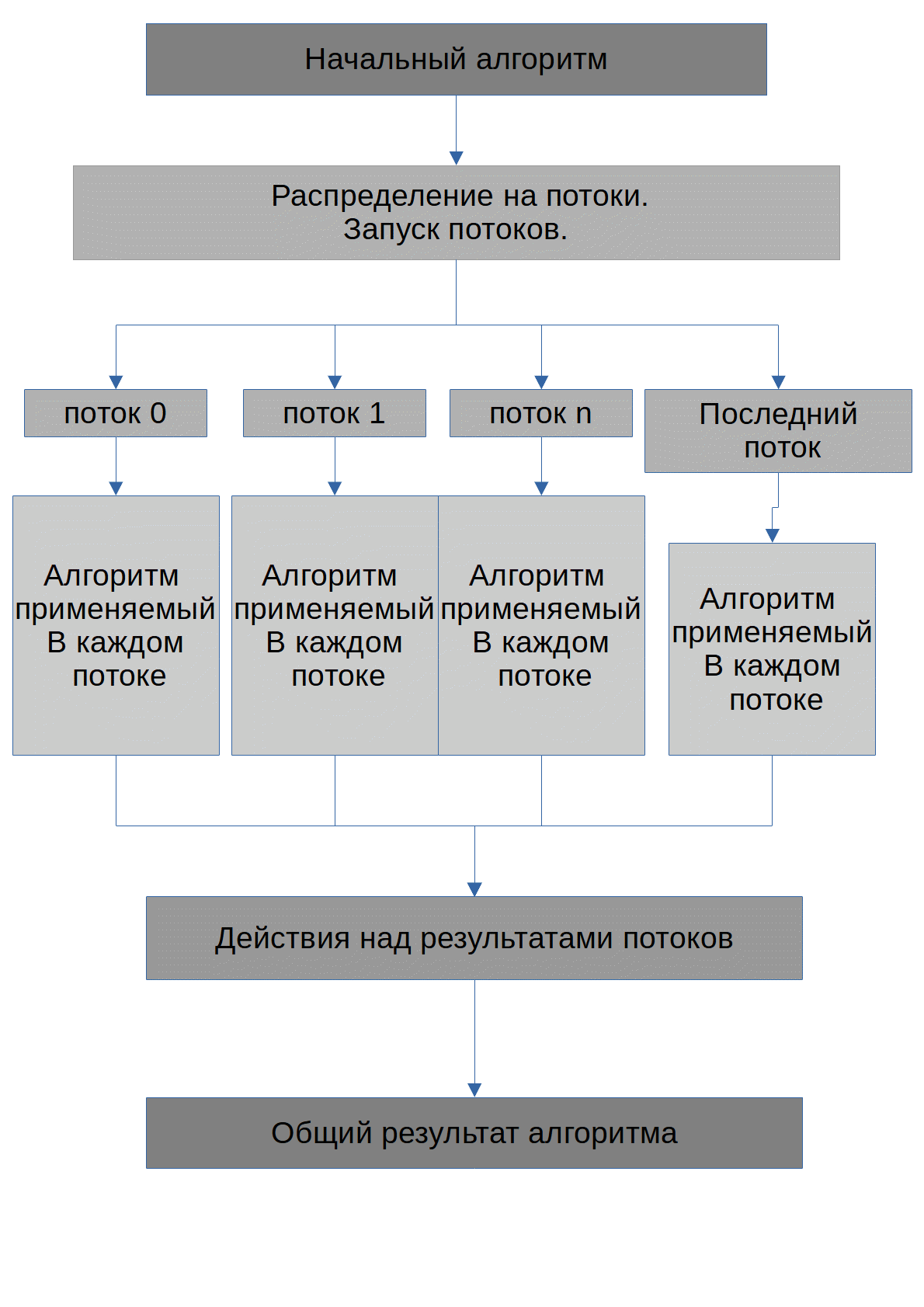
A tarefa do algoritmo é encontrar os números possíveis X, quando elevado ao grau degree_of, o número inicial max_number será obtido. Noto imediatamente que todos os números que serão transferidos para a GPU serão armazenados em matrizes. O algoritmo executado por cada thread se parece com este:
int degree_of=2;
int degree_of_max=Number_degree_of_max[0];//
int x=thread;//
int max_number=INPUT[0];//  ,
int Number=1;
int Degree;
bool BREAK=false;//   while
while(degree_of<=degree_of_max&&!BREAK){
    Number=1;
    for(int i=0;i<degree_of;i++){
        Number*=x;
        Degree=degree_of;
    }
    if(Number==max_number){
        OUT_NUMBER[thread]=X;//OUT_NUMBER         Degree
        OUT_DEGREE[thread]=Degree;// OUT_DEGREE         X
    }
   degree_of++;
   //     :
if(degree_of>degree_of_max||Number>max_number){
    BREAK=true;
}
}
Código a ser executado na CPU C ++. Cpp
#include <iostream>
#include<vector>
#include<string>//  getline
#include<thread>
#include<fstream>
using namespace std;
int Running_thread_counter = 0;
void Upload_to_CPU(unsigned long long  *Number, unsigned long long  *Stepn, bool *Stop,unsigned long long  *INPUT, unsigned long long  *max, int THREAD);
void Upload_to_CPU(unsigned long long  *Number, unsigned long long  *Stepn, bool *Stop,unsigned long long  *INPUT, unsigned long long  *max, int THREAD) {
	int thread = THREAD;
	Running_thread_counter++;
	unsigned long long  MAX_DEGREE_OF = max[0];
	int X = thread;
	unsigned long long  Calculated_number = 1;
	unsigned long long  DEGREE_OF = 2;
	unsigned long long   INP = INPUT[0];
	Stop[thread] = false;
	bool BREAK = false;
	if (X != 0 && X != 1) {
		while (!BREAK) {
			if (DEGREE_OF <= MAX_DEGREE_OF) {
				Calculated_number = 1;
				for (int counter = 0; counter < DEGREE_OF; counter++) {
					Calculated_number *= X;
				}
				if (Calculated_number == INP) {
					Stepn[thread] = DEGREE_OF;
					Number[thread] = X;
					Stop[thread] = true;
					BREAK = true;
				}
				DEGREE_OF++;
			}
			else { BREAK = true; }
		}
	}
}
void Parallelize_to_threads(unsigned long long  *Number, unsigned long long  *Stepn, bool *Stop,unsigned long long  *INPUT, unsigned long long  *max, int size);
int main()
{
	int size = 1000;
	unsigned long long  *Number = new unsigned long long[size], *Degree_of = new unsigned long long[size];
	unsigned long long  *Max_Degree_of = new unsigned long long[1];
	unsigned long long  *INPUT_NUMBER = new unsigned long long[1];
	Max_Degree_of[0] = 7900;

	INPUT_NUMBER[0] = 216 * 216 * 216;
	ifstream inp("input.txt");
	if (inp.is_open()) {
		string t;
		vector<unsigned long long>IN;
		while (getline(inp, t)) {
			IN.push_back(stol(t));

		}
		INPUT_NUMBER[0] = IN[0];//
		Max_Degree_of[0] = IN[1];//
	}
	else {
		ofstream error("error.txt");
		if (error.is_open()) {
			error << "No file " << '"' << "input.txt" << '"' << endl;
			error << "Please , create a file" << '"' << "input.txt" << '"' << endl;
			error << "One read:input number" << endl;
			error << "Two read:input max stepen" << endl;
			error << "." << endl;
			error.close();
			INPUT_NUMBER[0] = 1;
			Max_Degree_of[0] = 1;
		}
	}
	//    ,
	//cout << INPUT[0] << endl;
	bool *Elements_that_need_to_stop = new bool[size];
	Parallelize_to_threads(Number, Degree_of, Elements_that_need_to_stop, INPUT_NUMBER, Max_Degree_of, size);
	vector<unsigned long long>NUMBER, DEGREEOF;
	for (int i = 0; i < size; i++) {
		if (Elements_that_need_to_stop[i]) {
			if (Degree_of[i] < INPUT_NUMBER[0] && Number[i] < INPUT_NUMBER[0]) {//
				NUMBER.push_back(Number[i]);
				DEGREEOF.push_back(Degree_of[i]);
			}
		}
	}
	//    ,
	//
	/*
	for (int f = 0; f < NUMBER.size(); f++) {
			cout << NUMBER[f] << "^" << DEGREEOF[f] << "=" << INPUT_NUMBER[0] << endl;
		}
		*/
	ofstream out("out.txt");
	if (out.is_open()) {
		for (int f = 0; f < NUMBER.size(); f++) {
			out << NUMBER[f] << "^" << DEGREEOF[f] << "=" << INPUT_NUMBER[0] << endl;
		}
		out.close();
	}
}
void Parallelize_to_threads(unsigned long long  *Number, unsigned long long  *Stepn, bool *Stop,unsigned long long  *INPUT, unsigned long long  *max, int size) {
	thread *T = new thread[size];
	Running_thread_counter = 0;
	for (int i = 0; i < size; i++) {
		T[i] = thread(Upload_to_CPU, Number, Stepn, Stop, INPUT, max, i);
		T[i].detach();
	}
	while (Running_thread_counter < size - 1);//
}
Para que o algoritmo funcione, é necessário um arquivo de texto com um número inicial e grau máximo.
Código para fazer cálculos de GPU C ++. Cu
// cuda_runtime.h  device_launch_parameters.h
//   cyda
#include "cuda_runtime.h"
#include "device_launch_parameters.h"
#include<vector>
#include<string>// getline
#include <stdio.h>
#include<fstream>
using namespace std;
__global__ void Upload_to_GPU(unsigned long long  *Number,unsigned long long  *Stepn, bool *Stop,unsigned long long  *INPUT,unsigned long long  *max) {
	int thread = threadIdx.x;
	unsigned long long  MAX_DEGREE_OF = max[0];
    int X = thread;
	unsigned long long  Calculated_number = 1;
	unsigned long long  Current_degree_of_number = 2;
    unsigned long long   Original_numberP = INPUT[0];
	Stop[thread] = false;
	bool BREAK = false;
	if (X!=0&&X!=1) {
		while (!BREAK) {
			if (Current_degree_of_number <= MAX_DEGREE_OF) {
				Calculated_number = 1;
				for (int counter = 0; counter < Current_degree_of_number; counter++) {
				 Calculated_number	*=X;
				}
				if (Calculated_number == Original_numberP) {
					Stepn[thread] = Current_degree_of_number;
					Number[thread] = X;
					Stop[thread] = true;
					BREAK = true;
				}
				Current_degree_of_number++;
			}
			else { BREAK = true; }
		}
	}
}
cudaError_t Configure_cuda(unsigned long long *Number, unsigned long long  *Stepn, bool *Stop,unsigned long long  *INPUT, unsigned long long  *max,unsigned int size);
int main()
{
	int size = 1000;
    unsigned long long  *Number=new unsigned long long [size], *Degree_of=new unsigned long long [size];
	unsigned long long  *Max_degree_of = new unsigned long long [1];
	unsigned long long  *INPUT_NUMBER = new unsigned long long [1];
   Max_degree_of[0] = 7900;


	ifstream inp("input.txt");
	if (inp.is_open()) {
		string text;
		vector<unsigned long long>IN;
		while (getline(inp, text)) {
			IN.push_back( stol(text));

		}
		INPUT_NUMBER[0] = IN[0];
		Max_degree_of[0] = IN[1];
	}
	else {
		ofstream error("error.txt");
		if (error.is_open()) {
			error<<"No file "<<'"'<<"input.txt"<<'"'<<endl;
			error<<"Please , create a file" << '"' << "input.txt" << '"' << endl;
			error << "One read:input number" << endl;
			error << "Two read:input max stepen" << endl;
			error << "." << endl;
			error.close();
			INPUT_NUMBER[0] = 1;
			Max_degree_of[0] = 1;
		}
	}


	bool *Elements_that_need_to_stop = new bool[size];
    //    cuda
	cudaError_t cudaStatus =  Configure_cuda(Number, Degree_of, Elements_that_need_to_stop, INPUT_NUMBER, Max_degree_of, size);
    if (cudaStatus != cudaSuccess) {
        fprintf(stderr, "addWithCuda failed!");
        return 1;
    }
	vector<unsigned long long>NUMBER, DEGREEOF;
	for (int i = 0; i < size; i++) {
		if (Elements_that_need_to_stop[i]) {
			NUMBER.push_back(Number[i]);//
			DEGREEOF.push_back(Degree_of[i]);//
		}
	}
	//   ,
	/*
	for (int f = 0; f < NUMBER.size(); f++) {
		cout << NUMBER[f] << "^" << DEGREEOF[f] << "=" << INPUT_NUMBER[0] << endl;
	}*/
	ofstream out("out.txt");
	if (out.is_open()) {
		for (int f = 0; f < NUMBER.size(); f++) {
			out << NUMBER[f] << "^" << DEGREEOF[f] << "=" << INPUT_NUMBER[0] << endl;
		}
		out.close();
	}

    //
    cudaStatus = cudaDeviceReset();
    if (cudaStatus != cudaSuccess) {
        fprintf(stderr, "cudaDeviceReset failed!");
        return 1;
    }

    return 0;
}


cudaError_t  Configure_cuda(unsigned long long  *Number, unsigned long long *Degree_of, bool *Stop,unsigned long long *INPUT, unsigned long long *max,unsigned int size) {
	unsigned long long *dev_Number = 0;
	unsigned long long *dev_Degree_of = 0;
	unsigned long long *dev_INPUT = 0;
	unsigned long long *dev_Max = 0;
	bool *dev_Elements_that_need_to_stop;

	cudaError_t cudaStatus;

	//   GPU
	cudaStatus = cudaSetDevice(0);
	if (cudaStatus != cudaSuccess) {
		fprintf(stderr, "cudaSetDevice failed!  Do you have a CUDA-capable GPU installed?");
		goto Error;
	}

	//
	cudaStatus = cudaMalloc((void**)&dev_Number, size * sizeof(unsigned long long));
	if (cudaStatus != cudaSuccess) {
		fprintf(stderr, "cudaMalloc failed!dev_Number");
		goto Error;
	}
	cudaStatus = cudaMalloc((void**)&dev_Degree_of, size * sizeof(unsigned long long));
	if (cudaStatus != cudaSuccess) {
		fprintf(stderr, "cudaMalloc failed!dev_Degree_of");
		goto Error;
	}
	cudaStatus = cudaMalloc((void**)&dev_Max, size * sizeof(unsigned long long int));
	if (cudaStatus != cudaSuccess) {
		fprintf(stderr, "cudaMalloc failed!dev_Max");
		goto Error;
	}
	cudaStatus = cudaMalloc((void**)&dev_INPUT, size * sizeof(unsigned long long));
	if (cudaStatus != cudaSuccess) {
		fprintf(stderr, "cudaMalloc failed!dev_INPUT");
		goto Error;
	}
	cudaStatus = cudaMalloc((void**)&dev_Elements_that_need_to_stop, size * sizeof(bool));
	if (cudaStatus != cudaSuccess) {
		fprintf(stderr, "cudaMalloc failed!dev_Stop");
		goto Error;
	}
	//     GPU
	cudaStatus = cudaMemcpy(dev_Max, max, size * sizeof(unsigned long long), cudaMemcpyHostToDevice);
	if (cudaStatus != cudaSuccess) {
		fprintf(stderr, "cudaMemcpy failed!");
		goto Error;
	}
	cudaStatus = cudaMemcpy(dev_INPUT, INPUT, size * sizeof(unsigned long long), cudaMemcpyHostToDevice);
	if (cudaStatus != cudaSuccess) {
		fprintf(stderr, "cudaMemcpy failed!");
		goto Error;
	}
	Upload_to_GPU<<<1, size>>>(dev_Number, dev_Degree_of, dev_Elements_that_need_to_stop, dev_INPUT, dev_Max);
	//
	cudaStatus = cudaGetLastError();
	if (cudaStatus != cudaSuccess) {
		fprintf(stderr, "addKernel launch failed: %s\n", cudaGetErrorString(cudaStatus));
		goto Error;
	}

	//    ,

	cudaStatus = cudaDeviceSynchronize();
	if (cudaStatus != cudaSuccess) {
		fprintf(stderr, "cudaDeviceSynchronize returned error code %d after launching addKernel!\n", cudaStatus);
		goto Error;
	}

	//     GPU
	cudaStatus = cudaMemcpy(Number, dev_Number, size * sizeof(unsigned long long), cudaMemcpyDeviceToHost);
	if (cudaStatus != cudaSuccess) {
		fprintf(stderr, "cudaMemcpy failed!");
		goto Error;
	}
	cudaStatus = cudaMemcpy(Degree_of, dev_Degree_of, size * sizeof(unsigned long long), cudaMemcpyDeviceToHost);
	if (cudaStatus != cudaSuccess) {
		fprintf(stderr, "cudaMemcpy failed!");
		goto Error;
	}
	cudaStatus = cudaMemcpy(Stop, dev_Elements_that_need_to_stop, size * sizeof(bool), cudaMemcpyDeviceToHost);
	if (cudaStatus != cudaSuccess) {
		fprintf(stderr, "cudaMemcpy failed!");
		goto Error;
	}
Error://  GPU
	cudaFree(dev_INPUT);
	cudaFree(dev_Degree_of);
	cudaFree(dev_Max);
	cudaFree(dev_Elements_that_need_to_stop);
	cudaFree(dev_Number);

	return cudaStatus;
}
Identificador
__global__ Para trabalhar com a API CUDA, antes de chamar a função, você precisa reservar memória para o array e transferir os elementos para a memória da GPU. Isso aumenta a quantidade de código, mas permite descarregar a CPU, uma vez que os cálculos são feitos na GPU. Portanto, cuda fornece pelo menos a oportunidade de descarregar o processador para outras cargas de trabalho que não usam cuda.
No caso do exemplo no cuda, a tarefa do processador é apenas carregar as instruções na GPU e processar os resultados da GPU; Enquanto estiver no código da CPU, o processador processa cada thread. É importante notar que cyda tem limitações no número de threads que podem ser iniciados, então em ambos os algoritmos eu peguei o mesmo número de threads igual a 1000. Além disso, no caso da CPU, usei a variável
int Running_thread_counter = 0;para contar o número de threads já executados e esperar até que todas as threads sejam executadas.
Configuração de teste
CUDA GPU-Z
- CPU :amd ryzen 5 1400(4core,8thread)
- :8DDR4 2666
- GPU:Nvidia rtx 2060
- OS:windows 10 version 2004
- Cuda:
- Compute Capability 7.5
- Threads per Multiprocessor 1024
- CUDA 11.1.70
- GPU-Z:version 2.35.0
- Visual Studio 2017
CUDA GPU-Z
Para testar o algoritmo, usei
o seguinte código C #
, que criou um arquivo com dados iniciais, em seguida, lançou sequencialmente arquivos exe de algoritmos usando CPU ou GPU e mediu o tempo de sua operação, então inseriu este tempo e os resultados dos algoritmos no arquivo result.txt . O gerenciador de tarefas do Windows foi usado para medir a carga do processador .
using System;
using System.Collections.Generic;
using System.Linq;
using System.Text;
using System.Threading.Tasks;
using System.Diagnostics;
using System.IO;
namespace ConsoleAppTESTSTEPEN_CPU_AND_GPU_
{
    class Program
    {
        static string Upload(Int64 number,Int64 degree_of)
        {
            string OUT = "";
            string[] Chord_values = new string[2];
            Int64 Degree_of = degree_of;
            Int64 Number = number;
            Chord_values[0] = Number.ToString();
            Chord_values[1] = Degree_of.ToString();
            File.WriteAllLines("input.txt", Chord_values);//
            OUT+="input number:" + Number.ToString()+"\n";
            OUT+="input degree of number:" + Degree_of.ToString()+"\n";
            DateTime running_CPU_application = DateTime.Now;//
            Process proc=  Process.Start("ConsoleApplication29.exe");//exe    c++ x64  CPU
            while (!proc.HasExited) ;//
            DateTime stop_CPU_application = DateTime.Now;//
            string[]outs = File.ReadAllLines("out.txt");//
            File.Delete("out.txt");
            OUT+="CPU:"+"\n";
            if (outs.Length>0)
            {
                for (int j = 0; j < outs.Length; j++)
                {
                    OUT+=outs[j]+"\n";
                }
            }
            else { OUT+="no values"+"\n"; }
            OUT+="running_CPU_application:" + running_CPU_application.ToString()+"\n";
            OUT+="stop_CPU_application:" + stop_CPU_application.ToString()+"\n";
            OUT+="GPU:"+"\n";
            //     korenXN.exe x64    GPU
            DateTime running_GPU_application = DateTime.Now;
            Process procGPU = Process.Start("korenXN.exe");
            while (!procGPU.HasExited) ;
            DateTime stop_GPU_application = DateTime.Now;
            string[] outs2 = File.ReadAllLines("out.txt");
            File.Delete("out.txt");
            if (outs2.Length > 0)
            {
                for (int j = 0; j < outs2.Length; j++)
                {
                    OUT+=outs2[j]+"\n";
                }
            }
            else { OUT+="no values"+"\n"; }
            OUT+="running_GPU_application:" + running_GPU_application.ToString()+"\n";
            OUT+="stop_GPU_application:" + stop_GPU_application.ToString()+"\n";
            return OUT;//
        }
        static void Main()
        {
            Int64 start = 36*36;//
            Int64 degree_of_strat = 500;//
            int size = 20-5;//
            Int64[] Number = new Int64[size];//
            Int64[] Degree_of = new Int64[size];//
            string[]outs= new string[size];//
            for (int n = 0; n < size; n++)
            {
                if (n % 2 == 0)
                {
                    Number[n] = start * start;
                }
                else
                {
                    Number[n] = start * degree_of_strat;
                    Number[n] -= n + n;
                }
                start += 36*36;
                Degree_of[n] = degree_of_strat;
                degree_of_strat +=1000;
            }
            for (int n = 0; n < size; n++)
            {
                outs[n] = Upload(Number[n], Degree_of[n]);
                Console.WriteLine(outs[n]);
            }
            System.IO.File.WriteAllLines("result.txt", outs);//    result.txt
        }
    }
}
Os resultados do teste são mostrados na tabela:

Como você pode ver na tabela, o tempo de execução do algoritmo na GPU é um pouco maior do que na CPU.
No entanto, observo que durante a operação do algoritmo usando a GPU para cálculos, a carga da CPU exibida no Gerenciador de Tarefas não excedeu 30%, enquanto o algoritmo usando a CPU para cálculos carregou em 68-85%o que, por sua vez, às vezes tornava outros aplicativos mais lentos. Além disso, abaixo está um gráfico que mostra a diferença no
tempo de execução (eixo Y) da CPU e GPU em relação ao número de entrada (eixo X).
cronograma

Então decidi testar com o processador carregado com outros aplicativos. O processador foi carregado de forma que o teste iniciado no aplicativo não consumisse mais que 55% dos recursos do processador. Os resultados do teste são mostrados abaixo:
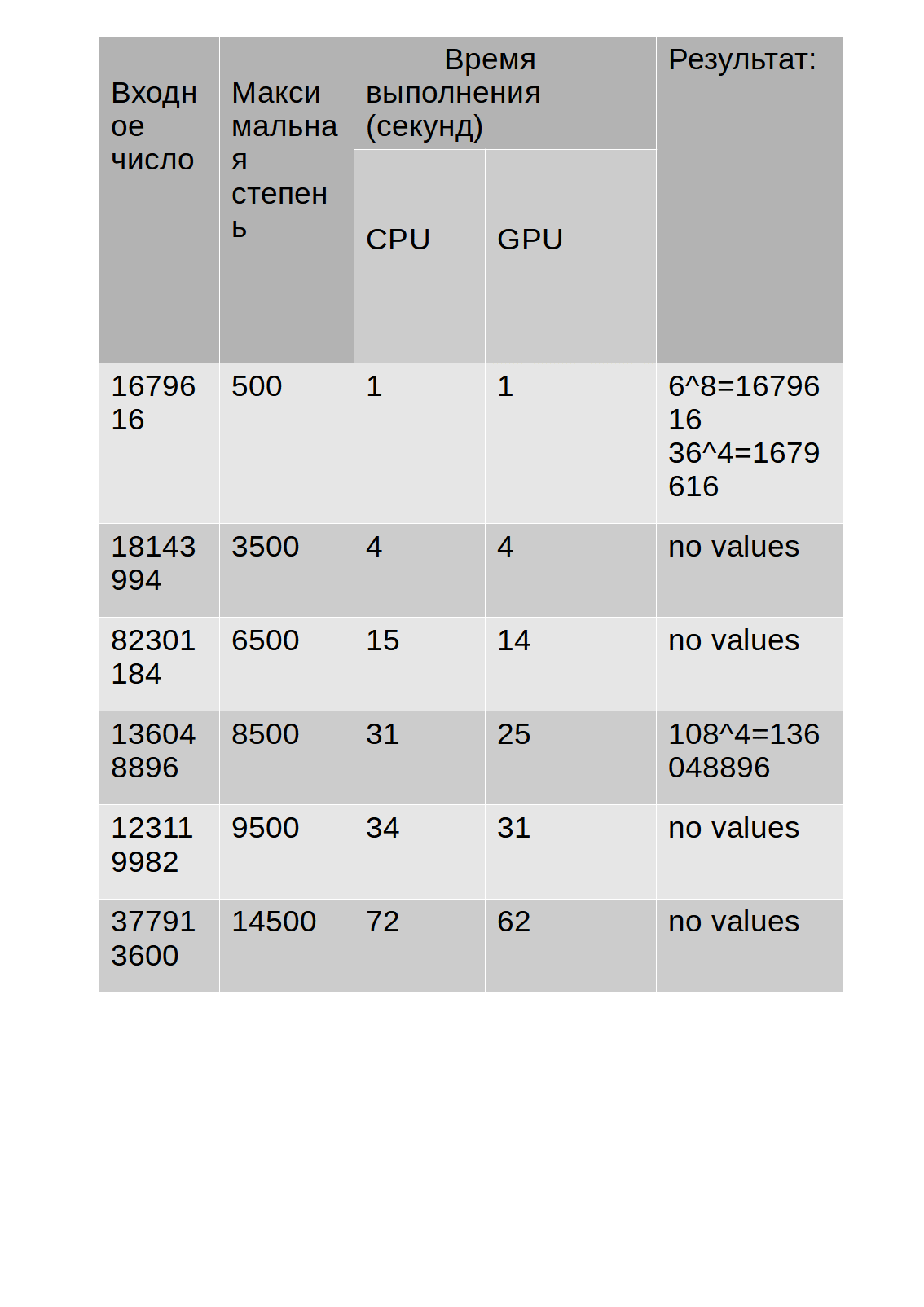
Cronograma

Como pode ser visto na tabela, no caso de uma CPU carregada, realizar cálculos em uma GPU dá um aumento de desempenho, uma vez que uma carga de processador de 30% fica dentro do limite de 55%, e no caso de usar uma CPU para cálculos, sua carga é de 68-85% , o que retarda a operação do algoritmo se a CPU for carregada com outros aplicativos.
A razão pela qual o GPU fica atrás do CPU, na minha opinião, pode ser que o CPU tem um desempenho de núcleo superior (CPU de 3400 MHz, GPU de 1680 MHz). No caso em que os núcleos do processador são carregados com outros processos, o desempenho dependerá do número de threads processados ao longo de um determinado intervalo de tempo, e neste caso a GPU será mais rápida, pois é capaz de processar mais threads simultaneamente (1024 GPU, 8 CPU)
Portanto, podemos concluir que o uso da GPU para cálculos não necessariamente proporciona uma operação mais rápida do algoritmo, porém, pode descarregar a CPU, que pode desempenhar um papel se for carregada com outras aplicações.
Recursos: