Todo programador C ++ deve ser capaz de encontrar vazamentos de memória. C ++ é uma linguagem complexa, cometer erros é fácil e encontrá-los pode ser uma tarefa árdua. Isso é especialmente verdadeiro para vazamentos de memória. A situação de captura de vazamentos de memória só piora se a biblioteca Qt for usada no código C ++.
Este artigo é dedicado a várias ferramentas que podem ser usadas com vários graus de sucesso para detectar vazamentos de memória em aplicativos C ++ / Qt (desktop). As ferramentas serão revisadas em conjunto com o IDE do Visual Studio 2019. Este artigo não cobrirá todas as ferramentas possíveis, mas apenas as mais populares e eficazes.
Nossa equipe vem estudando essas ferramentas há muito tempo e de perto e as utiliza em seu trabalho. A quantidade de código em que é possível testar essas ferramentas é de cerca de 1,5 milhão de linhas. Com base na vasta experiência prática, falaremos sobre os prós e os contras de diferentes ferramentas, o que elas são capazes de encontrar e o que é muito difícil, falaremos sobre nuances não óbvias e, o mais importante, faremos uma tabela comparativa resumida com base um exemplo real. Tentaremos atualizá-lo da forma mais rápida e simples possível (mostrar um início rápido), portanto, mesmo que você, leitor, nunca tenha procurado por vazamentos de memória, este artigo o ajudará a descobrir e encontrar seu primeiro vazamento em um par de horas. Vai!
Qual é o problema?
Um vazamento de memória é uma situação em que a memória foi alocada (por exemplo, pelo novo operador) e não foi excluída por engano pelo operador / função de exclusão correspondente (por exemplo, excluir).
Exemplo 1.
int* array = nullptr;
for (int i = 0; i < 5; i++)
{
array = new int[10];
}
delete[] array;
Há um vazamento aqui ao alocar memória para os primeiros 4 arrays. 160 bytes vazaram. A última matriz é removida corretamente. Portanto, o vazamento está estritamente em uma linha:
array = new int[10];
Exemplo 2.
class Test
{
public:
Test()
{
a = new int[100];
b = new int[300];
}
~Test()
{
delete[] a;
delete[] b;
}
private:
int* a;
int* b;
};
int main()
{
Test* test = new Test;
return 0;
}
Já existem mais vazamentos aqui: a memória para a (400 bytes), para b (1200 bytes) e para teste (16 bytes para x64) não foi excluída. No entanto, a remoção de aeb é fornecida no código, mas não ocorre devido à ausência de uma chamada para o destruidor de teste. Assim, existem três vazamentos, mas o erro que leva a esses vazamentos é apenas um, e é gerado pela linha
Test* test = new Test;
Ao mesmo tempo, não há erros no código da classe Test.
Exemplo 3.
Vamos ter uma aula de Qt, mais ou menos assim:
class InfoRectangle : public QLabel
{
Q_OBJECT
public:
InfoRectangle(QWidget* parent = nullptr);
private slots:
void setInfoTextDelayed();
private:
QTimer* _textSetTimer;
};
InfoRectangle::InfoRectangle(QWidget* parent)
: QLabel(parent)
{
_textSetTimer = new QTimer(this);
_textSetTimer->setInterval(50);
connect(_textSetTimer, &QTimer::timeout, this, &InfoRectangle::setInfoTextDelayed);
}
void InfoRectangle::setInfoTextDelayed()
{
// do anything
setVisible(true);
}
Vamos também ter a alocação de memória em algum lugar do código:
InfoRectangle* rectangle = new InfoRectangle();
, delete? , Qt. , , :
mnuLayout->addWidget(rectangle);
rectangle->setParent(this);
– . , : , . – InfoRectangle
. – QTimer,
_textSetTimer
Qt. , – connect
.
, new :
template <typename Func1, typename Func2>
static inline QMetaObject::Connection connect(
const typename QtPrivate::FunctionPointer<Func1>::Object *sender, Func1 signal,
const typename QtPrivate::FunctionPointer<Func2>::Object *receiver, Func2 slot,
Qt::ConnectionType type = Qt::AutoConnection)
{
typedef QtPrivate::FunctionPointer<Func1> SignalType;
typedef QtPrivate::FunctionPointer<Func2> SlotType;
const int *types = nullptr;
if (type == Qt::QueuedConnection || type == Qt::BlockingQueuedConnection)
types = QtPrivate::ConnectionTypes<typename SignalType::Arguments>::types();
return connectImpl(sender, reinterpret_cast<void **>(&signal),
receiver, reinterpret_cast<void **>(&slot),
new QtPrivate::QSlotObject<Func2, typename QtPrivate::List_Left<
typename SignalType::Arguments, SlotType::ArgumentCount>::Value,
typename SignalType::ReturnType>(slot),
type, types, &SignalType::Object::staticMetaObject);
}
, . , . , Qt, connect, Qt, , , .
: , . . – , , , , , ( ). , . , , .
, , , ? …
– , , , . . , . , . , () . , , .
|
|
|
|
|
- |
|
|
1.5 |
: , 1, 2, , |
|
7 |
253 |
1. .
, .
Intel Inspector
Intel Inspector – , Visual Studio . Intel Inspector , , , .
Intel Inspector Intel Parallel Studio 2019, Intel Inspector, . Visual Studio 2019 Intel Parallel Studio. , Intel Inspector Visual Studio (. 1).
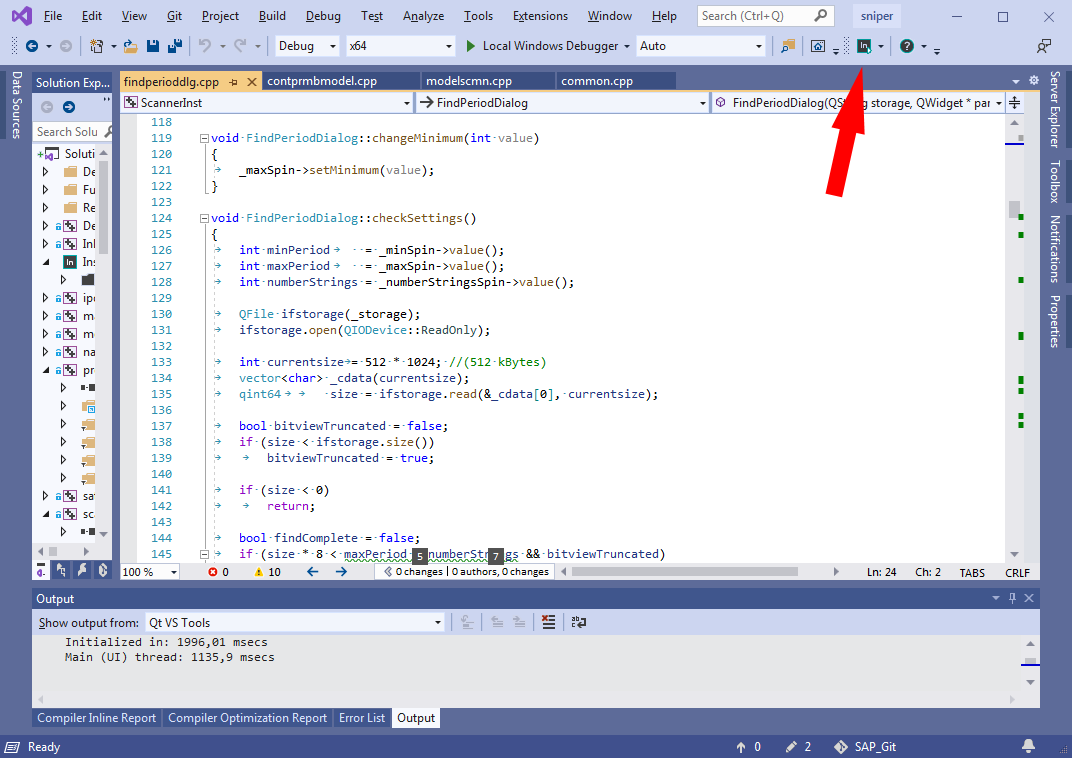
Intel Inspector’ , - «Intel Inspector».
- Intel Inspector . «Detect Leaks» , (. 2). - , , , , .
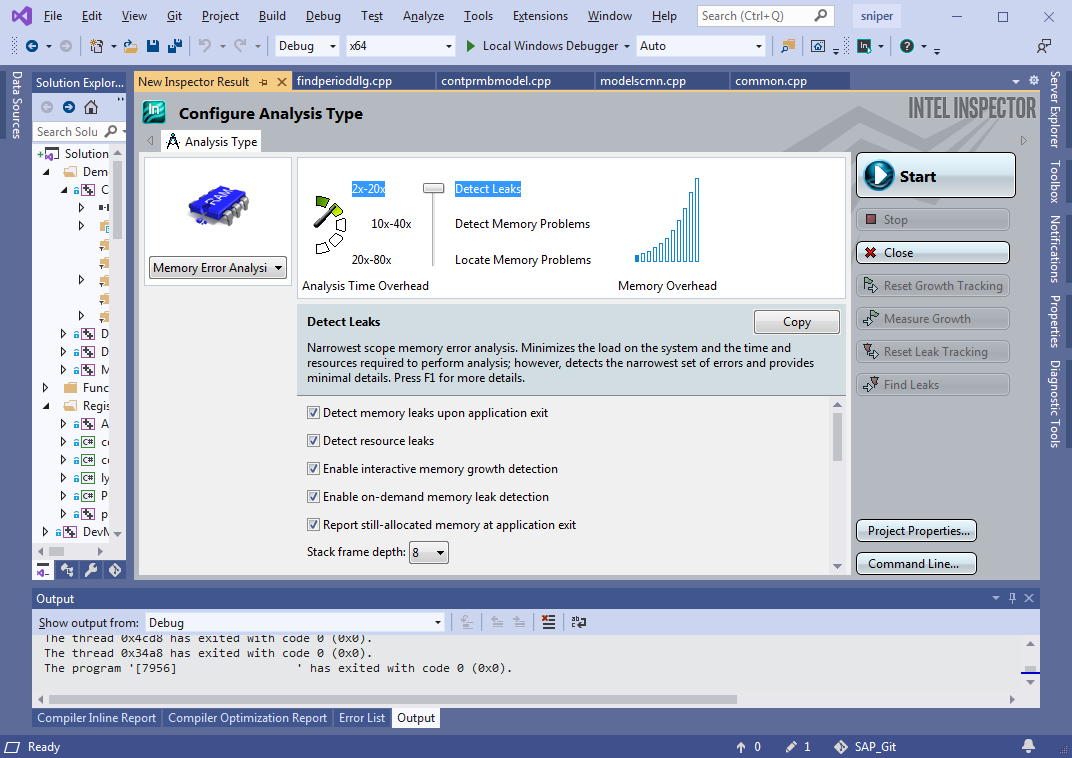
«Start», . , ( , «» ), . , , . , . , (. . 1). , Intel Inspector (. 3):
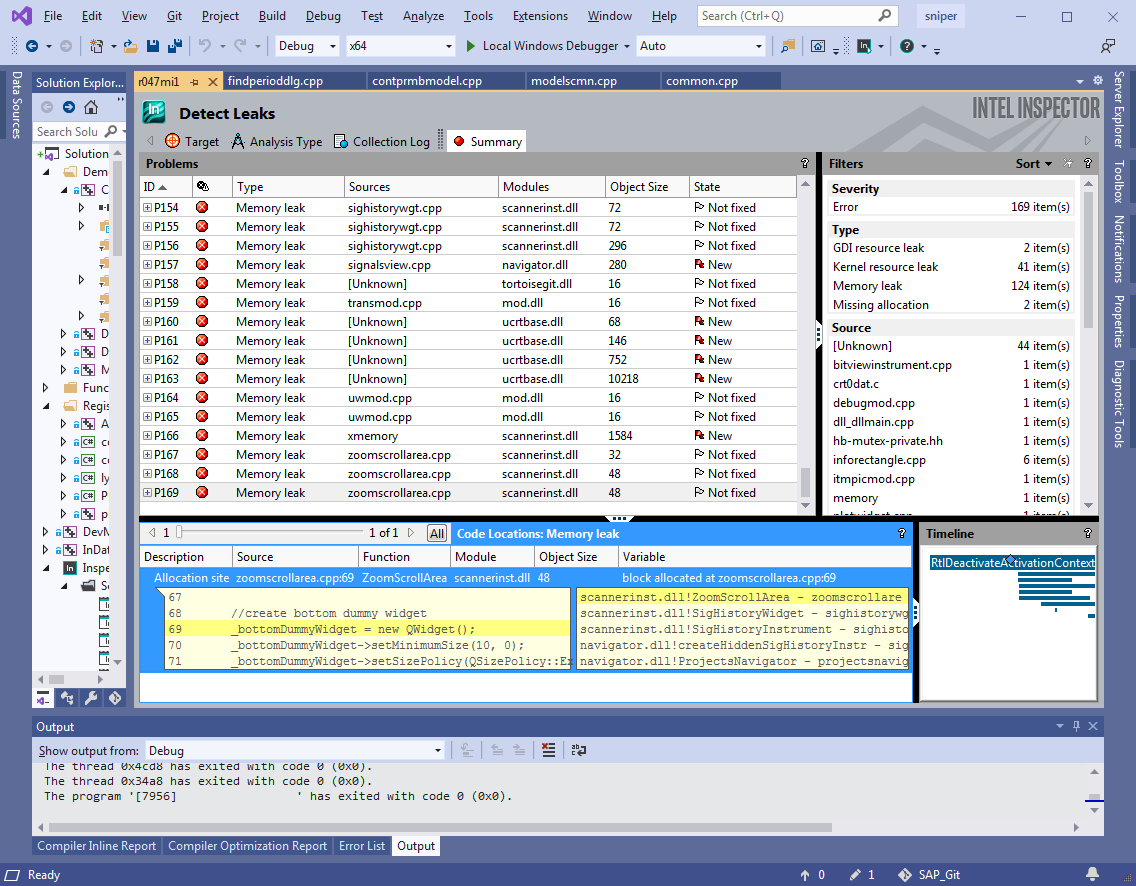
, , , call-stack . , . . – IDE!
, . debug , release . ++- , debug , release ( 20 ), debug' . – release (, ), . Intel Inspector' , . , release , .
: Intel Inspector ( ) , debug release. (. 1).
|
|
, |
|
|
|
|
||
Release c |
10 |
70 |
7 |
Debug |
101 |
973 |
9,6 |
2. Intel Inspector`
, . . , , , , , , 10 . ( debug), 100 . ( , ) .
– ? ? , Intel Inspector`?
|
|
- : n |
|
: r |
: (n-r)/n |
: N/n |
||
: N |
|
|
|||||
Release c |
7 |
192 |
168 |
24 |
0 |
1 (100%) |
27 |
Debug |
7 |
129 |
107 |
22 |
0 |
1 (100%) |
18 |
3. Intel Inspector
, Intel Inspector . , . . , Intel Inspector, , , , , «» ( 2 3, . ).
, Intel Inspector , – . , , release , debug. , , – , .
.
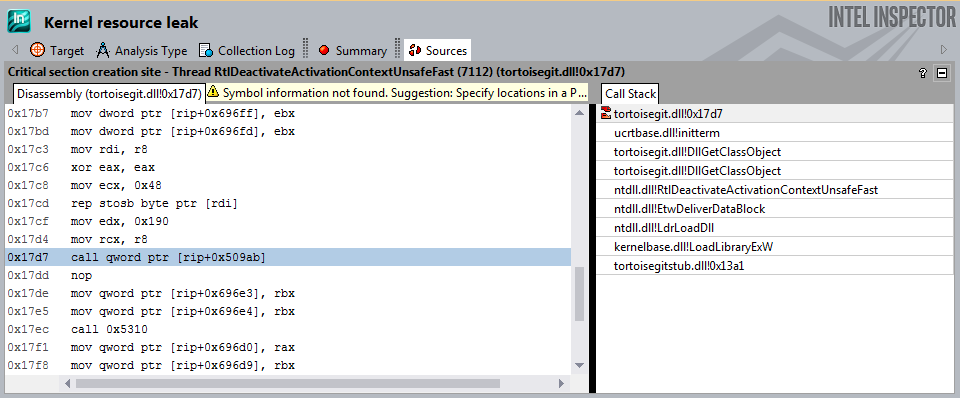
1. dll.
Intel Inspector dll, . , .
2. aligned_malloc
.
m_pVitData = (VITDEC_DATA*)_aligned_malloc(sizeof(VITDEC_DATA), 16);
m_pDcsnBuf = (byte*)_aligned_malloc(64 * (VITM6_BUF_LEN + VITM6_MAX_WND_LEN), 16);
...
_aligned_free(m_pDcsnBuf);
_aligned_free(m_pVitData);
, "" release, debug .
3. Pragma.
#pragma omp parallel for schedule(dynamic)
for (int portion = 0; portion < portionsToProcess; ++portion)
{
…
}
#pragma
!
, - ( Intel Inspector, VS, ..) , – . , (<50000 ) Intel Inspector . – , .
Intel Inspector – , ( ), . release , ( , ), debug. debug .
, Intel Inspector . , , . , «» Intel Inspector, , «» .
Visual Leak Detector
Visual Leak Detector ( VLD) – , Output (IDE Visual Studio 2019) .
, Visual Studio .
VLD VLD, , , .. .
VLD ( vld-2.5.1-setup.exe) , ( Path Visual Studio). .
VLD dll- Visual Studio 2019, dbghelp.dll
C:\Program Files (x86)\Microsoft Visual Studio\2019\Enterprise\Common7\IDE\Extensions\TestPlatform\Extensions\Cpp\x64
C:\Program Files (x86)\Visual Leak Detector\bin\Win64
.
:
#pragma once //#define LEAKS_DETECTION #ifdef LEAKS_DETECTION #include <vld.h> #endif
, , .
(pp) . , solution.
#define LEAKS_DETECTION
solution. (F5) , . debug. Release c .
VLD Output. , call-stack , .
, VLD
---------- Block 652047 at 0x0000000027760070: 8787200 bytes ----------
Leak Hash: 0x02B5C300, Count: 1, Total 8787200 bytes
Call Stack (TID 30996):
ucrtbased.dll!malloc()
d:\agent\_work\63\s\src\vctools\crt\vcstartup\src\heap\new_array.cpp (29): SniperCore.dll!operator new[]()
D:\SOURCE\SAP_Git\sap_win64\core\alg\fbg\ddec\S2Ldfg.cpp (445): SniperCore.dll!CS2Ldfg::CreateLLRTbls() + 0xD bytes
D:\SOURCE\SAP_Git\sap_win64\core\alg\fbg\ddec\S2Ldfg.cpp (217): SniperCore.dll!CS2Ldfg::SetModeEB()
D:\SOURCE\SAP_Git\sap_win64\core\alg\fbg\ddec\S2Ldfg.cpp (1447): SniperCore.dll!CS2Ldfg::Set() + 0xA bytes
D:\SOURCE\SAP_Git\sap_win64\core\alg\fbg\ddec\ddec.cpp (509): SniperCore.dll!DFBase::instanceS2Dec()
D:\SOURCE\SAP_Git\sap_win64\core\alg\fbg\ddec\ddec.cpp (58): SniperCore.dll!DFBase::DFBase() + 0xF bytes
D:\SOURCE\SAP_Git\sap_win64\core\alg\fbg\ddec\ddec.cpp (514): SniperCore.dll!DgbS5FecAnlzr::DgbS5FecAnlzr() + 0xA bytes
D:\SOURCE\SAP_Git\sap_win64\core\alg\fbg\fbganalyser.cpp (45): SniperCore.dll!TechnicalLayer::FBGAnalyser::FBGAnalyser() + 0x21 bytes
D:\SOURCE\SAP_Git\sap_win64\core\engine\handlers\fbganalysishandler.cpp (218): SniperCore.dll!TechnicalLayer::FBGAnalysisHandler::init() + 0x2A bytes
D:\SOURCE\SAP_Git\sap_win64\core\engine\handlers\fbganalysishandler.cpp (81): SniperCore.dll!TechnicalLayer::FBGAnalysisHandler::enqueueRequest()
D:\SOURCE\SAP_Git\sap_win64\core\engine\threadedhandler2.cpp (57): SniperCore.dll!TotalCore::ThreadedHandler2::run()
Qt5Cored.dll!QTextStream::realNumberPrecision() + 0x89E8E bytes
kernel32.dll!BaseThreadInitThunk() + 0xD bytes
ntdll.dll!RtlUserThreadStart() + 0x1D bytes
Data:
00 00 00 00 01 01 01 01 01 01 01 02 02 02 02 02 ........ ........
02 02 03 03 03 03 03 03 03 04 04 04 04 04 04 04 ........ ........
05 05 05 05 05 05 05 05 06 06 06 06 06 06 06 07 ........ ........
07 07 07 07 07 07 08 08 08 08 08 08 08 09 09 09 ........ ........
09 09 09 09 0A 0A 0A 0A 0A 0A 0A 0B 0B 0B 0B 0B ........ ........
0B 0B 0C 0C 0C 0C 0C 0C 0C 0D 0D 0D 0D 0D 0D 0D ........ ........
0E 0E 0E 0E 0E 0E 0E 0E 0F 0F 0F 0F 0F 0F 0F 10 ........ ........
10 10 10 10 10 10 11 11 11 11 11 11 11 12 12 12 ........ ........
EE EE EE EE EF EF EF EF EF EF EF F0 F0 F0 F0 F0 ........ ........
F0 F0 F1 F1 F1 F1 F1 F1 F1 F2 F2 F2 F2 F2 F2 F2 ........ ........
F3 F3 F3 F3 F3 F3 F3 F3 F4 F4 F4 F4 F4 F4 F4 F5 ........ ........
F5 F5 F5 F5 F5 F5 F6 F6 F6 F6 F6 F6 F6 F7 F7 F7 ........ ........
F7 F7 F7 F7 F8 F8 F8 F8 F8 F8 F8 F9 F9 F9 F9 F9 ........ ........
F9 F9 FA FA FA FA FA FA FA FB FB FB FB FB FB FB ........ ........
FC FC FC FC FC FC FC FC FD FD FD FD FD FD FD FE ........ ........
FE FE FE FE FE FE FF FF FF FF FF FF FF 00 00 00 ........ ........
---------- Block 2430410 at 0x000000002E535B70: 48 bytes ----------
Leak Hash: 0x7062B343, Count: 1, Total 48 bytes
Call Stack (TID 26748):
ucrtbased.dll!malloc()
d:\agent\_work\63\s\src\vctools\crt\vcstartup\src\heap\new_scalar.cpp (35): SniperCore.dll!operator new() + 0xA bytes
C:\Program Files (x86)\Microsoft Visual Studio\2019\Enterprise\VC\Tools\MSVC\14.28.29333\include\xmemory (78): SniperCore.dll!std::_Default_allocate_traits::_Allocate()
C:\Program Files (x86)\Microsoft Visual Studio\2019\Enterprise\VC\Tools\MSVC\14.28.29333\include\xmemory (206): SniperCore.dll!std::_Allocate<16,std::_Default_allocate_traits,0>() + 0xA bytes
C:\Program Files (x86)\Microsoft Visual Studio\2019\Enterprise\VC\Tools\MSVC\14.28.29333\include\xmemory (815): SniperCore.dll!std::allocator<TotalCore::TaskResult *>::allocate()
C:\Program Files (x86)\Microsoft Visual Studio\2019\Enterprise\VC\Tools\MSVC\14.28.29333\include\vector (744): SniperCore.dll!std::vector<TotalCore::TaskResult *,std::allocator<TotalCore::TaskResult *> >::_Emplace_reallocate<TotalCore::TaskResult * const &>() + 0xF bytes
C:\Program Files (x86)\Microsoft Visual Studio\2019\Enterprise\VC\Tools\MSVC\14.28.29333\include\vector (708): SniperCore.dll!std::vector<TotalCore::TaskResult *,std::allocator<TotalCore::TaskResult *> >::emplace_back<TotalCore::TaskResult * const &>() + 0x1F bytes
C:\Program Files (x86)\Microsoft Visual Studio\2019\Enterprise\VC\Tools\MSVC\14.28.29333\include\vector (718): SniperCore.dll!std::vector<TotalCore::TaskResult *,std::allocator<TotalCore::TaskResult *> >::push_back()
D:\SOURCE\SAP_Git\sap_win64\include\core\engine\task.h (119): SniperCore.dll!TotalCore::LongPeriodTask::setTmpResult()
D:\SOURCE\SAP_Git\sap_win64\include\core\engine\discretestephandler.h (95): SniperCore.dll!TotalCore::DiscreteStepHandler::setResult()
D:\SOURCE\SAP_Git\sap_win64\core\engine\handlers\prmbdtcthandler.cpp (760): SniperCore.dll!TechnicalLayer::PrmbDtctHandler::setContResult() + 0x1A bytes
D:\SOURCE\SAP_Git\sap_win64\core\engine\handlers\prmbdtcthandler.cpp (698): SniperCore.dll!TechnicalLayer::PrmbDtctHandler::processPortion()
D:\SOURCE\SAP_Git\sap_win64\core\engine\threadedhandler2.cpp (109): SniperCore.dll!TotalCore::ThreadedHandler2::tryProcess()
D:\SOURCE\SAP_Git\sap_win64\core\engine\threadedhandler2.cpp (66): SniperCore.dll!TotalCore::ThreadedHandler2::run()
Qt5Cored.dll!QTextStream::realNumberPrecision() + 0x89E8E bytes
kernel32.dll!BaseThreadInitThunk() + 0xD bytes
ntdll.dll!RtlUserThreadStart() + 0x1D bytes
Data:
10 03 51 05 00 00 00 00 B0 B4 85 09 00 00 00 00 ..Q..... ........
60 9D B9 08 00 00 00 00 D0 1B 24 06 00 00 00 00 `....... ..$.....
30 B5 4F 11 00 00 00 00 CD CD CD CD CD CD CD CD 0.O..... ........
:
Visual Leak Detector detected 383 memory leaks (253257876 bytes).
Largest number used: 555564062 bytes.
Total allocations: 2432386151 bytes.
Visual Leak Detector is now exiting.
, ,
No memory leaks detected.
Visual Leak Detector is now exiting.
debug : VLD . , release ( ) vld . . 4 release debug. (. . 1).
|
|
, |
, VLD, |
|
VLD |
VLD |
||
Debug |
101 |
172 |
1,7 |
Release c |
10 |
- |
- |
4. VLD
? ? , VLD?
|
|
- : n |
|
: r |
: (n-r)/n |
: N/n |
||
: N |
|
|
|||||
Debug |
7 |
185 |
185 |
0 |
0 |
1 (100%) |
26 |
5. VLD
, VLD . . , VLD, , , , , «» ( 2 3, . ). - , ( ), «». , , :
connect(arrowKeyHandler, &ArrowKeyHandler::upPressed,
[this] { selectNeighbourSignal(TopSide); });
, , , , connect (. 3). - .
, VLD , . continuous integration.
Visual Leak Detector – , ( ) . VLD , , , Intel Inspector debug. , «» , continuous integration.
. , vld . , , .
VS 2019
IDE Visual Studio 2019 – Diagnostic Tools. (snapshots). () . , , , .
( debug release c ). Diagnostic Tools. Memory Usage, Heap Profiling Take Snapshot.
, - , , . , , . , .
Break All , , , .
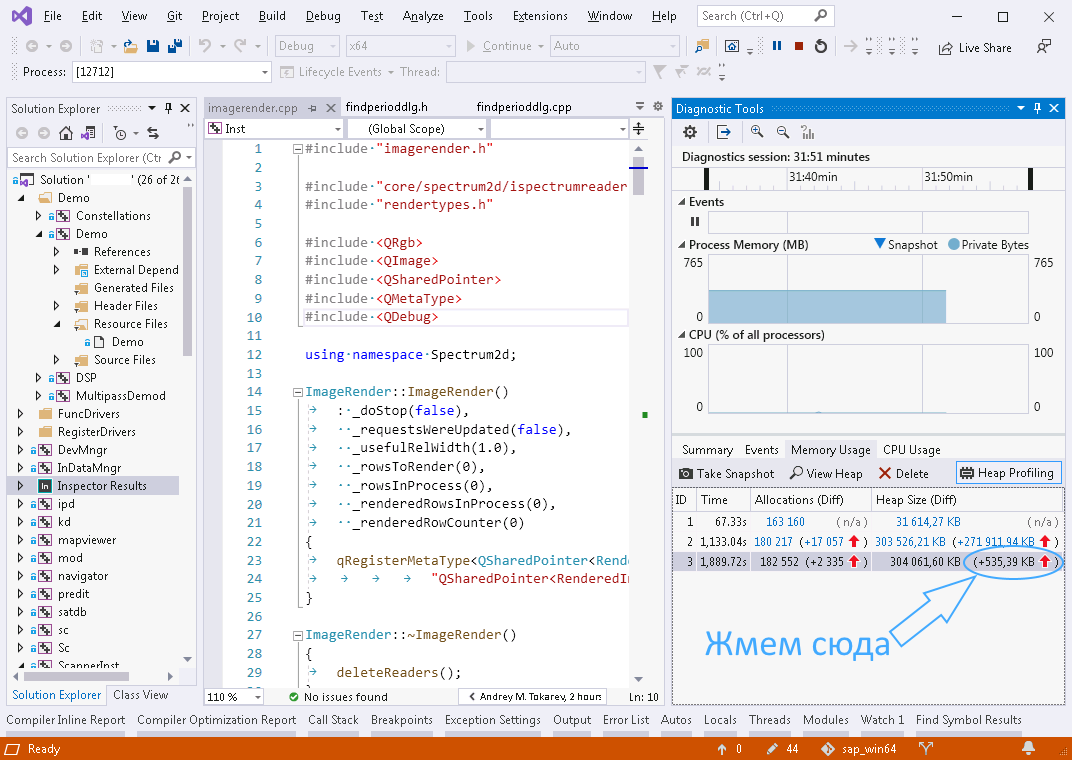
(. . 5, ). ViewMode -> Stacks View ( Types View), :
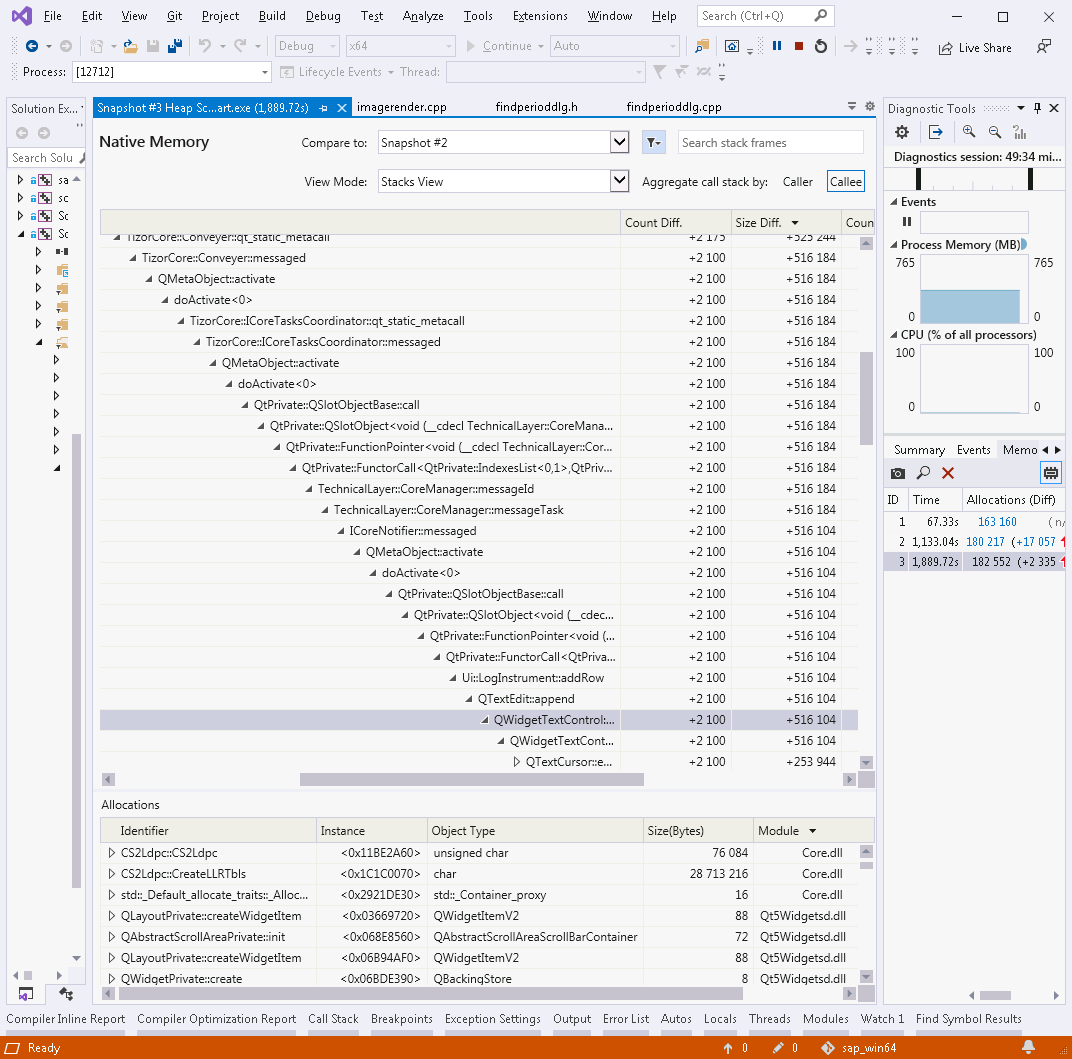
, Qt: , Qt. , . (. . 1), . , .
, (, ..). , , . ( ) .
PVS-Studio
, , - PVS-Studio. , . , solution. , «», .
. PVS-Studio Visual Studio 2019, «Extensions».
solution` Extensions->PVS-Studio->Check. «PVS-Studio» , «» High, Medium Low.
, , PVS-Studio . , , : V599, V680, V689, V701, V772, V773, V1005, V1023 ( . ).
Visual Studio Tools -> Options -> PVS-Studio «Detectable Errors (C++)» , ( «Hide All», ) – . 8. «Detectable Errors (C#)» ( «Hide All» «Disabled»).
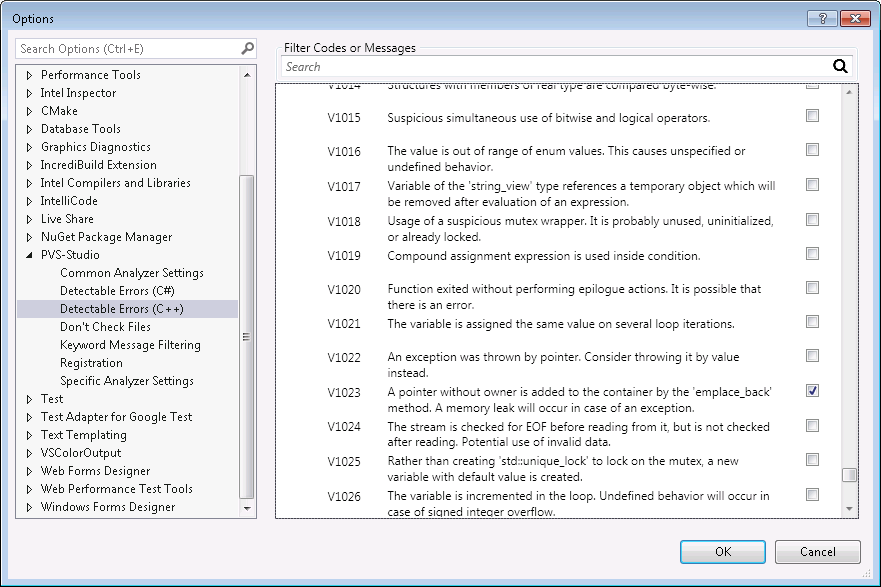
, , PVS-Studio High, Medium Low .
, , 1.5 2269 . Intel Core i7 4790K. (debug release) , ( , - , ).
|
- : n |
|
: r |
: (n-r)/n |
||
|
|
|
|
||||
30 |
7 |
2 |
0 |
2 |
7 |
0 % |
6. PVS-Studio
, - (Intel Inspector, VLD). , . , PVS-Studio .
, 2 – Intel Inspector Visual Leak Detector. :
|
|
Intel Inspector |
VLD |
|
|
|
|
|
|
() |
|
|
|
|
|
debug |
9.6 |
1,7 |
release |
7 |
- |
Ele encontra vazamentos reais na depuração |
Sim tudo. Redundância de resultados - 18 vezes. |
Sim tudo. Redundância de resultados - 26 vezes. |
Ele encontra vazamentos reais no lançamento com informações de depuração |
Sim tudo. Redundância de resultados - 27 vezes. |
- |
Depurar falsos positivos |
sim, um pouco |
Não |
Falsos positivos na versão com informações de depuração |
sim, um pouco |
- |
Posso usar em integração contínua |
Não |
sim |
Tabela7. Comparação do Intel Inspector e VLD.
É aconselhável atribuir o lugar nº 1 na classificação ao VLD, uma vez que não produz falsos positivos, é mais estável em operação e é mais adequado para uso em cenários de integração contínua.