A primeira coisa que o usuário vê é a IU do aplicativo. E no desenvolvimento móvel, a maioria dos desafios está associada à sua construção, e na maior parte do tempo o desenvolvedor gasta no layout do cheesecake e na lógica da camada de apresentação. Existem muitas abordagens para resolver esses problemas no mundo. Parte do que vamos cobrir provavelmente já está em uso na indústria. Mas tentamos reunir alguns deles, e temos certeza de que serão úteis para você.
No início do projeto, queríamos chegar a esse processo de desenvolvimento de recursos, a fim de fazer o mínimo possível de alterações no código e, ao mesmo tempo, atender ao máximo os desejos dos designers, bem como ter em mãos uma ampla gama de ferramentas e abstrações para lidar com o clichê.
Este artigo será útil para aqueles que desejam gastar menos tempo em processos de layout de rotina e lógica repetitiva para processar estados de tela.
Estilo declarativo da IU
Ver modificadores também conhecidos como decorador
Iniciando o desenvolvimento, decidimos organizar a construção de componentes de IU da forma mais flexível possível, com a capacidade de montar algo a partir de peças prontas no local.
Para fazer isso, decidimos usar decoradores: eles correspondem à nossa ideia de simplicidade e capacidade de reutilização do código.
Decoradores são uma estrutura de fechamento que estende a funcionalidade da visualização sem a necessidade de herança.
public struct ViewDecorator<View: UIView> {
let decoration: (View) -> Void
func decorate(_ view: View) {
decoration(view)
}
}
public protocol DecoratableView: UIView {}
extension DecoratableView {
public init(decorator: ViewDecorator<Self>) {
self.init(frame: .zero)
decorate(with: decorator)
}
@discardableResult
public func decorated(with decorator: ViewDecorator<Self>) -> Self {
decorate(with: decorator)
return self
}
public func decorate(with decorator: ViewDecorator<Self>) {
decorator.decorate(self)
currentDecorators.append(decorator)
}
public func redecorate() {
currentDecorators.forEach {
$0.decorate(self)
}
}
}
Por que não usamos subclasses:
Eles são difíceis de acorrentar;
Não há como descartar a funcionalidade da classe pai;
Deve ser descrito separadamente do contexto de uso (em um arquivo separado)
UI .
.
static var headline2: ViewDecorator<View> {
ViewDecorator<View> {
$0.decorated(with: .font(.f2))
$0.decorated(with: .textColor(.c1))
}
}
, .
private let titleLabel = UILabel()
.decorated(with: .headline2)
.decorated(with: .multiline)
.decorated(with: .alignment(.center))
, , .
.
:
private let fancyLabel = UILabel(
decorator: .text("?? ???? ???"))
.decorated(with: .cellTitle)
.decorated(with: .alignment(.center))
:
private let fancyLabel: UILabel = {
let label = UILabel()
label.text = "???? ? ????"
label.numberOfLines = 0
label.font = .f4
label.textColor = .c1
label.textAlignment = .center
return label
}()
— 9 4. .
navigation bar , :
navigationController.navigationBar .decorated(with: .titleColor(.purple)) .decorated(with: .transparent)
:
static func titleColor(_ color: UIColor) -> ViewDecorator<UINavigationBar> {
ViewDecorator<UINavigationBar> {
let titleTextAttributes: [NSAttributedString.Key: Any] = [
.font: UIFont.f3,
.foregroundColor: color
]
let largeTitleTextAttributes: [NSAttributedString.Key: Any] = [
.font: UIFont.f1,
.foregroundColor: color
]
if #available(iOS 13, *) {
$0.modifyAppearance {
$0.titleTextAttributes = titleTextAttributes
$0.largeTitleTextAttributes = largeTitleTextAttributes
}
} else {
$0.titleTextAttributes = titleTextAttributes
$0.largeTitleTextAttributes = largeTitleTextAttributes
}
}
}
static var transparent: ViewDecorator<UINavigationBar> {
ViewDecorator<UINavigationBar> {
if #available(iOS 13, *) {
$0.isTranslucent = true
$0.modifyAppearance {
$0.configureWithTransparentBackground()
$0.backgroundColor = .clear
$0.backgroundImage = UIImage()
}
} else {
$0.setBackgroundImage(UIImage(), for: .default)
$0.shadowImage = UIImage()
$0.isTranslucent = true
$0.backgroundColor = .clear
}
}
}
:
navigation bar
override var navigationBarDecorators: [ViewDecorator<UINavigationBar>] {
[.withoutBottomLine, .fillColor(.c0), .titleColor(.c1)]
}
: , .
- : , .
HStack, VStack
, , , , . , .
, iOS . , .
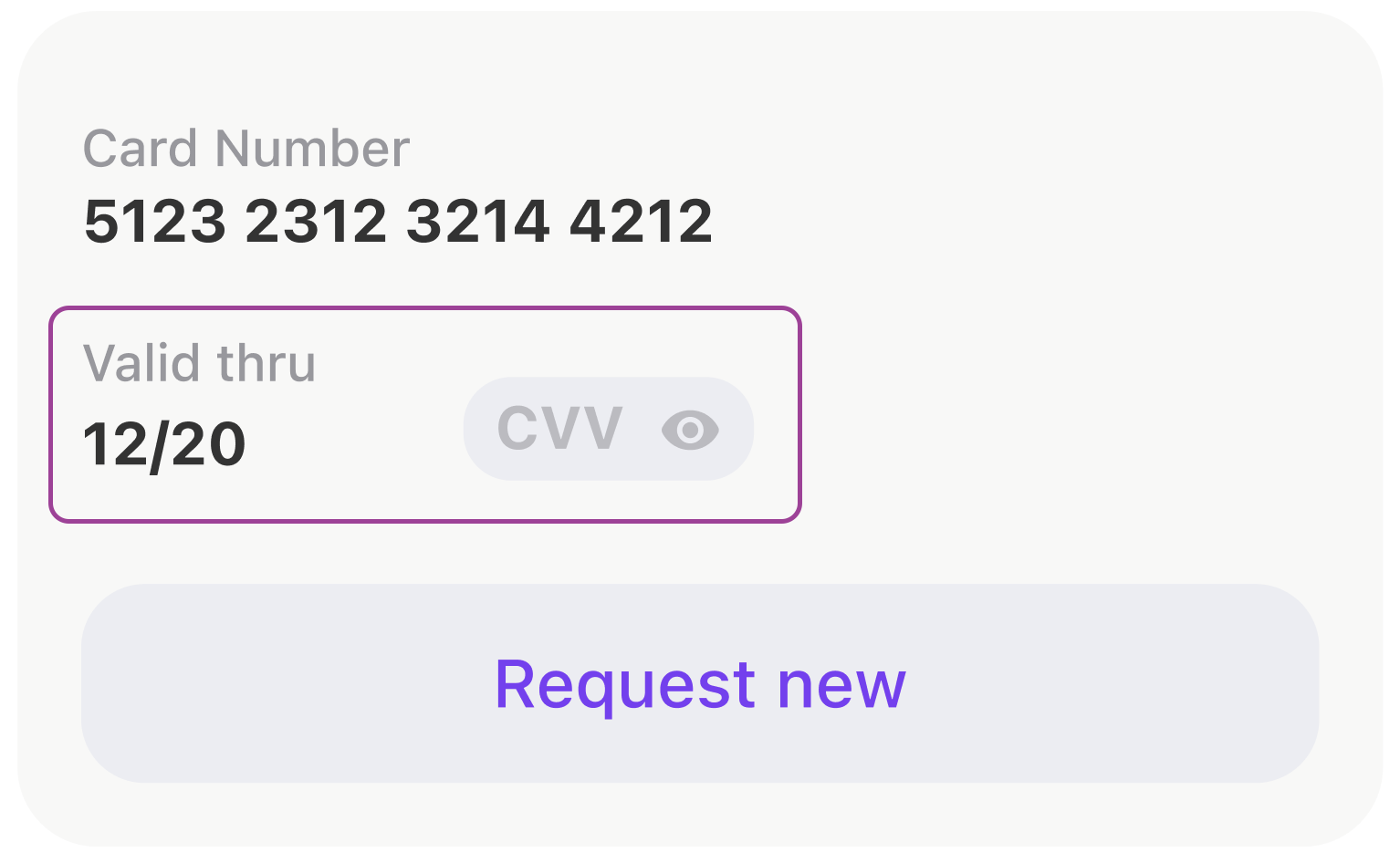
, .
- anchors.
[expireDateTitleLabel, expireDateLabel, cvcCodeView].forEach {
view.addSubview($0)
$0.translatesAutoresizingMaskIntoConstraints = false
}
NSLayoutConstraint.activate([
expireDateTitleLabel.topAnchor.constraint(equalTo: view.topAnchor),
expireDateTitleLabel.leftAnchor.constraint(equalTo: view.leftAnchor),
expireDateLabel.topAnchor.constraint(equalTo: expireDateTitleLabel.bottomAnchor, constant: 2),
expireDateLabel.leftAnchor.constraint(equalTo: view.leftAnchor),
expireDateLabel.bottomAnchor.constraint(equalTo: view.bottomAnchor),
cvcCodeView.leftAnchor.constraint(equalTo: expireDateTitleLabel.rightAnchor, constant: 44),
cvcCodeView.bottomAnchor.constraint(equalTo: view.bottomAnchor),
cvcCodeView.rightAnchor.constraint(equalTo: view.rightAnchor)
])
, UIStackView .
let stackView = UIStackView()
stackView.alignment = .bottom
stackView.axis = .horizontal
stackView.layoutMargins = .init(top: 0, left: 16, bottom: 0, right: 16)
stackView.isLayoutMarginsRelativeArrangement = true
let expiryDateStack: UIStackView = {
let stackView = UIStackView(
arrangedSubviews: [expireDateTitleLabel, expireDateLabel]
)
stackView.setCustomSpacing(2, after: expireDateTitleLabel)
stackView.axis = .vertical
stackView.layoutMargins = .init(top: 8, left: 0, bottom: 0, right: 0)
stackView.isLayoutMarginsRelativeArrangement = true
return stackView
}()
let gapView = UIView()
gapView.setContentCompressionResistancePriority(.defaultLow, for: .horizontal)
gapView.setContentHuggingPriority(.defaultLow, for: .horizontal)
stackView.addArrangedSubview(expiryDateStack)
stackView.addArrangedSubview(gapView)
stackView.addArrangedSubview(cvcCodeView)
, . . , WWDC SwiftUI. , Apple ! , , .
view.layoutUsing.stack {
$0.hStack(
alignedTo: .bottom,
$0.vStack(
expireDateTitleLabel,
$0.vGap(fixed: 2),
expireDateLabel
),
$0.hGap(fixed: 44),
cvcCodeView,
$0.hGap()
)
}
, SwiftUI
var body: some View {
HStack(alignment: .bottom) {
VStack {
expireDateTitleLabel
Spacer().frame(width: 0, height: 2)
expireDateLabel
}
Spacer().frame(width: 44, height: 0)
cvcCodeView
Spacer()
}
}
iOS- UITableView UICollectionView. , . , . : , . .
, . .
private let listAdapter = VerticalListAdapter<CommonCollectionViewCell>()
private let collectionView = UICollectionView(
frame: .zero,
collectionViewLayout: UICollectionViewFlowLayout()
)
.
func setupCollection() {
listAdapter.heightMode = .fixed(height: 8)
listAdapter.setup(collectionView: collectionView)
listAdapter.spacing = Constants.pocketSpacing
listAdapter.onSelectItem = output.didSelectPocket
}
. .
listAdapter.reload(items: viewModel.items)
, .
:
(UITableView -> UICollectionView).
,
,
, : , , , .
.
Shimmering Views
. (shimmering views).
- , UI .
, view, , .

, , .
SkeletonView, :
func makeStripAnimation() -> CAKeyframeAnimation {
let animation = CAKeyframeAnimation(keyPath: "locations")
animation.values = [
Constants.stripGradientStartLocations,
Constants.stripGradientEndLocations
]
animation.repeatCount = .infinity
animation.isRemovedOnCompletion = false
stripAnimationSettings.apply(to: animation)
return animation
}
:
protocol SkeletonDisplayable {...}
protocol SkeletonAvailableScreenTrait: UIViewController, SkeletonDisplayable {...}
extension SkeletonAvailableScreenTrait {
func showSkeleton(animated: Bool = false) {
addAnimationIfNeeded(isAnimated: animated)
skeletonViewController.view.isHidden = false
skeletonViewController.setLoading(true)
}
func hideSkeleton(animated: Bool = false) {
addAnimationIfNeeded(isAnimated: animated)
skeletonViewController.view.isHidden = true
skeletonViewController.setLoading(false)
}
}
, . :
setupSkeleton()
Smart skeletons
, , . , . .
- UI : , , , -:
public protocol SkeletonDrivenLoadableView: UIView {
associatedtype LoadableSubviewID: CaseIterable
typealias SkeletonBone = (view: SkeletonBoneView, excludedPinEdges: [UIRectEdge])
func loadableSubview(for subviewId: LoadableSubviewID) -> UIView
func skeletonBone(for subviewId: LoadableSubviewID) -> SkeletonBone
}
, , .
extension ActionButton: SkeletonDrivenLoadableView {
public enum LoadableSubviewID: CaseIterable {
case icon
case title
}
public func loadableSubview(for subviewId: LoadableSubviewID) -> UIView {
switch subviewId {
case .icon:
return solidView
case .title:
return titleLabel
}
}
public func skeletonBone(for subviewId: LoadableSubviewID) -> SkeletonBone {
switch subviewId {
case .icon:
return (ActionButton.iconBoneView, excludedPinEdges: [])
case .title:
return (ActionButton.titleBoneView, excludedPinEdges: [])
}
}
}
UI :
actionButton.setLoading(isLoading, shimmering: [.icon])
// or
actionButton.setLoading(isLoading, shimmering: [.icon, .title])
// which is equal to
actionButton.setLoading(isLoading)
, , , , .
, , . , .
, , , .
:
final class ScreenStateMachine: StateMachine<ScreenState, ScreenEvent> {
public init() {
super.init(state: .initial,
transitions: [
.loadingStarted: [.initial => .loading, .error => .loading],
.errorReceived: [.loading => .error],
.contentReceived: [.loading => .content, .initial => .content]
])
}
}
.
class StateMachine<State: Equatable, Event: Hashable> {
public private(set) var state: State {
didSet {
onChangeState?(state)
}
}
private let initialState: State
private let transitions: [Event: [Transition]]
private var onChangeState: ((State) -> Void)?
public func subscribe(onChangeState: @escaping (State) -> Void) {
self.onChangeState = onChangeState
self.onChangeState?(state)
}
@discardableResult
open func processEvent(_ event: Event) -> State {
guard let destination = transitions[event]?.first(where: { $0.source == state })?.destination else {
return state
}
state = destination
return state
}
public func reset() {
state = initialState
}
}
, .
func reloadTariffs() {
screenStateMachine.processEvent(.loadingStarted)
interactor.obtainTariffs()
}
, - .
protocol ScreenInput: ErrorDisplayable,
LoadableView,
SkeletonDisplayable,
PlaceholderDisplayable,
ContentDisplayable
, :
state machine :
final class DogStateMachine: StateMachine<ConfirmByCodeResendingState, ConfirmByCodeResendingEvent> {
init() {
super.init(
state: .laying,
transitions: [
.walkCommand: [
.laying => .walking,
.eating => .walking,
],
.seatCommand: [.walking => .sitting],
.bunnyCommand: [
.laying => .sitting,
.sitting => .sittingInBunnyPose
]
]
)
}
}
, ? .
public extension ScreenStateMachineTrait {
func setupScreenStateMachine() {
screenStateMachine.subscribe { [weak self] state in
guard let self = self else { return }
switch state {
case .initial:
self.initialStateDisplayableView?.setupInitialState()
self.skeletonDisplayableView?.hideSkeleton(animated: false)
self.placeholderDisplayableView?.setPlaceholderVisible(false)
self.contentDisplayableView?.setContentVisible(false)
case .loading:
self.skeletonDisplayableView?.showSkeleton(animated: true)
self.placeholderDisplayableView?.setPlaceholderVisible(false)
self.contentDisplayableView?.setContentVisible(false)
case .error:
self.skeletonDisplayableView?.hideSkeleton(animated: true)
self.placeholderDisplayableView?.setPlaceholderVisible(true)
self.contentDisplayableView?.setContentVisible(false)
case .content:
self.skeletonDisplayableView?.hideSkeleton(animated: true)
self.placeholderDisplayableView?.setPlaceholderVisible(false)
self.contentDisplayableView?.setContentVisible(true)
}
}
}
private var skeletonDisplayableView: SkeletonDisplayable? {
view as? SkeletonDisplayable
}
// etc.
}
.
.
, , , .
.
.
struct ErrorViewModel {
let title: String
let message: String?
let presentationStyle: PresentationStyle
}
enum PresentationStyle {
case alert
case banner(
interval: TimeInterval = 3.0,
fillColor: UIColor? = nil,
onHide: (() -> Void)? = nil
)
case placeholder(retryable: Bool = true)
case silent
}
ErrorDisplayable:
public protocol ErrorDisplayable: AnyObject {
func showError(_ viewModel: ErrorViewModel)
}
public protocol ErrorDisplayableViewTrait: UIViewController, ErrorDisplayable, AlertViewTrait {}
.
public extension ErrorDisplayableViewTrait {
func showError(_ viewModel: ErrorViewModel) {
switch viewModel.presentationStyle {
case .alert:
// show alert
case let .banner(interval, fillColor, onHide):
// show banner
case let .placeholder(retryable):
// show placeholder
case .silent:
return
}
}
}
, . , . , .
extension APIError: ErrorViewModelConvertible {
public func viewModel(_ presentationStyle: ErrorViewModel.PresentationStyle) -> ErrorViewModel {
.init(
title: Localisation.network_error_title,
message: message,
presentationStyle: presentationStyle
)
}
}
extension CommonError: ErrorViewModelConvertible {
public func viewModel(_ presentationStyle: ErrorViewModel.PresentationStyle) -> ErrorViewModel {
.init(
title: title,
message: message,
presentationStyle: isSilent ? .silent : presentationStyle
)
}
}
, , .
- 196,8934010152
- 138,2207792208
- 1
- 1
UI . , , .
, UI , , .
, -.
. . .
, . , , !