Decidi que quero mudar o volume do som e das faixas de áudio em um laptop com Windows a partir de um controle remoto infravermelho. Arduino uno, um monte de fios com uma placa de ensaio, um sensor infravermelho, um laptop e, na verdade, um controle remoto infravermelho.
Existe uma ideia, existe ferro, mas a teoria é fraca. Como posso fazer com que meu computador compreenda os sinais infravermelhos do controle remoto e execute as ações necessárias? Decidi usar um arduino para receber sinais de controle remoto através do sensor infravermelho da placa de ensaio e enviar mensagens para o laptop via USB. Isso exigia pelo menos algum conhecimento de como tudo funciona.
Foi decidido investigar.
Apresentando o Arduino ao controle remoto
Para receber um sinal do controle remoto infravermelho, é necessário um receptor, que conectaremos ao arduino por meio de uma placa de ensaio de acordo com o seguinte esquema:
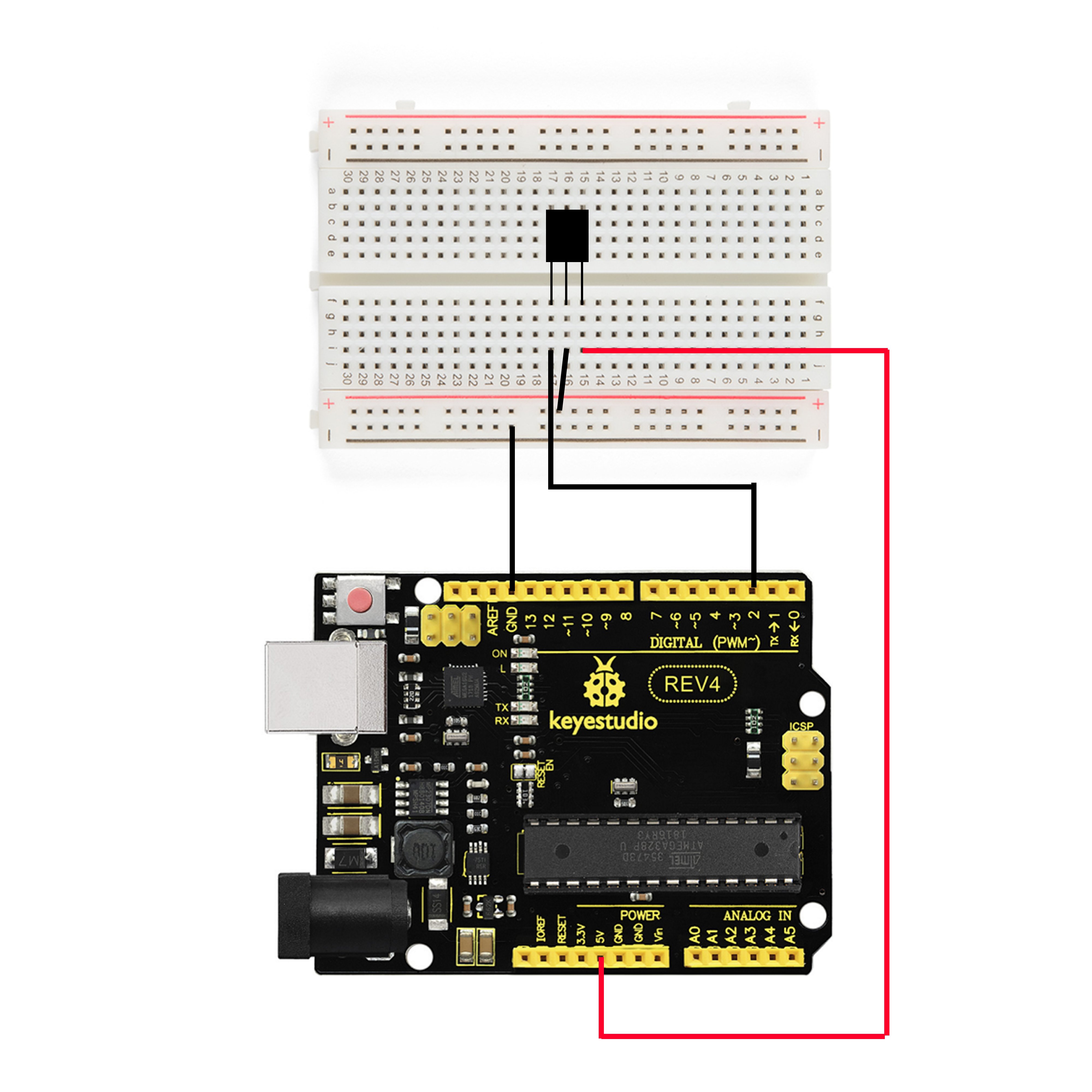
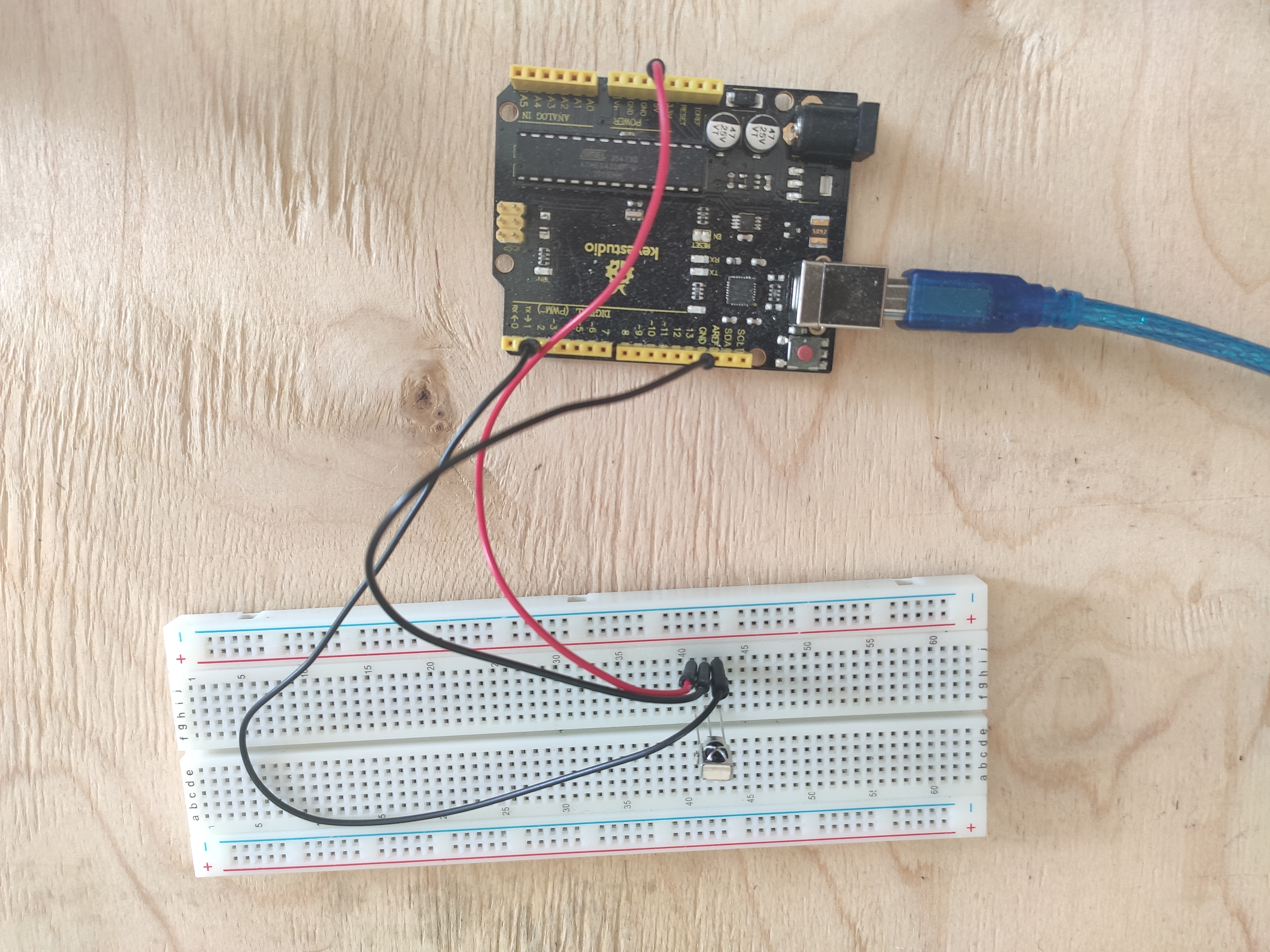
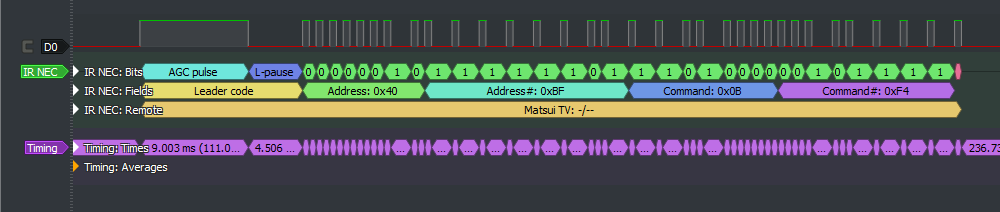
Para que o arduino entenda por qual protocolo e com que comando o sinal é transmitido, existe a biblioteca IRremote, que em novas versões do IDE Arduino pode ser adicionada a partir das bibliotecas padrão.
(/ ). 5 .
, , , IrReceiver.decodedIRData.decodedRawData. , . . , . , :
#include <IRremote.h>
int IR_RECEIVE_PIN = 2; // 2-
long command;
void setup()
{
Serial.begin(9600);
IrReceiver.begin(IR_RECEIVE_PIN, ENABLE_LED_FEEDBACK);
}
void loop() {
if (IrReceiver.decode()) //
{
command = IrReceiver.decodedIRData.decodedRawData; /*
*/
switch(command) //
{
case 0xEA15FF00:
Serial.write("D"); delay(120);
break;
case 0xB946FF00:
Serial.write("U"); delay(120);
break;
case 0xBF40FF00:
Serial.write("P"); delay(120);
break;
case 0xBC43FF00:
Serial.write("N"); delay(120);
break;
case 0xBB44FF00:
Serial.write("R"); delay(120);
break;
}
IrReceiver.resume(); //
}
}
, , USB.
Windows
- . ++ Visual Studio Windows.h
, , SendInput :
INPUT Input = { 0 };
Input.type = INPUT_KEYBOARD;
Input.ki.wVk = VK_VOLUME_UP; /* ,
*/
SendInput(1, &Input, sizeof(Input));
ZeroMemory(&Input, sizeof(Input));
: (VK_VOLUME_UP, VK_VOLUME_DOWN); (VK_MEDIA_PLAY_PAUSE); "" (VK_MEDIA_NEXT_TRACK, VK_MEDIA_PREV_TRACK)
Serial port ?
USB, (Serial port), Windows COM , IBM PC. , , . Windows.h
#include <Windows.h>
#include <stdio.h>
#include <string.h>
int main(void)
{
HANDLE Port;
BOOL Status;
DCB dcbSerialParams = { 0 };
COMMTIMEOUTS timeouts = { 0 };
DWORD dwEventMask;
char ReadData;
DWORD NoBytesRead;
bool Esc = FALSE;
Port = CreateFile(L"\\\\.\\COM3", GENERIC_READ, 0, NULL, //
OPEN_EXISTING, 0, NULL);
if (Port == INVALID_HANDLE_VALUE)
{
printf("\nError to Get the COM state\n");
CloseHandle(Port);
}
else
{
printf("\nopening serial port is succesful\n");
}
dcbSerialParams.DCBlength = sizeof(dcbSerialParams);
Status = GetCommState(Port, &dcbSerialParams); //
if (Status == FALSE)
{
printf("\n Error to Get the COM state \n");
CloseHandle(Port);
}
dcbSerialParams.BaudRate = CBR_9600; //
dcbSerialParams.ByteSize = 8;
dcbSerialParams.StopBits = ONESTOPBIT;
dcbSerialParams.Parity = NOPARITY;
Status = SetCommState(Port, &dcbSerialParams);
if (Status == FALSE)
{
printf("\n Error to Setting DCB Structure \n ");
CloseHandle(Port);
}
timeouts.ReadIntervalTimeout = 10; /*
( ) */
timeouts.ReadTotalTimeoutConstant = 200;
timeouts.ReadTotalTimeoutMultiplier = 2;
if (SetCommTimeouts(Port, &timeouts) == FALSE)
{
printf("\n Error to Setting Timeouts");
CloseHandle(Port);
}
while (Esc == FALSE)
{
Status = SetCommMask(Port, EV_RXCHAR);
if (Status == FALSE)
{
printf("\nError to in Setting CommMask\n");
CloseHandle(Port);
}
Status = WaitCommEvent(Port, &dwEventMask, NULL); /*
( ) */
if (Status == FALSE)
{
printf("\nError! in Setting WaitCommEvent () \n");
CloseHandle(Port);
}
Status = ReadFile(Port, &ReadData, 3, &NoBytesRead, NULL); //
printf("\nNumber of bytes received = % d\n\n", sizeof(ReadData) - 1);
switch (ReadData) /*
*/
{
case 'U':
{
INPUT Input = { 0 };
Input.type = INPUT_KEYBOARD;
Input.ki.wVk = VK_VOLUME_UP;
SendInput(1, &Input, sizeof(Input));
ZeroMemory(&Input, sizeof(Input));
}
break;
case 'D':
{
INPUT Input = { 0 };
Input.type = INPUT_KEYBOARD;
Input.ki.wVk = VK_VOLUME_DOWN;
SendInput(1, &Input, sizeof(Input));
ZeroMemory(&Input, sizeof(Input));
}
break;
case 'P':
{
INPUT Input = { 0 };
Input.type = INPUT_KEYBOARD;
Input.ki.wVk = VK_MEDIA_PLAY_PAUSE;
SendInput(1, &Input, sizeof(Input));
ZeroMemory(&Input, sizeof(Input));
}
break;
case 'N':
{
INPUT Input = { 0 };
Input.type = INPUT_KEYBOARD;
Input.ki.wVk = VK_MEDIA_NEXT_TRACK;
SendInput(1, &Input, sizeof(Input));
ZeroMemory(&Input, sizeof(Input));
}
break;
case 'R':
{
INPUT Input = { 0 };
Input.type = INPUT_KEYBOARD;
Input.ki.wVk = VK_MEDIA_PREV_TRACK;
SendInput(1, &Input, sizeof(Input));
ZeroMemory(&Input, sizeof(Input));
}
break;
default:
printf("\n Error\n");
break;
}
PurgeComm(Port, PURGE_RXCLEAR); //
}
CloseHandle(Port); /* ,
*/
}
https://www.xanthium.in/Serial-Port-Programming-using-Win32-API
http://citforum.ru/hardware/articles/comports/
, , . : - .
Essa combinação (códigos remotos + virtuais) tem o potencial de controlar diferentes partes do sistema operacional. Por exemplo, você pode atribuir programas aos botões ou criar algo como um controlador com o controle remoto. Mas o mais conveniente, na minha opinião, é o gerenciamento de mídia.